
A commission plan allows planning fees and varying it for users or instruments. Commission plans can be assigned to specific users or user groups.
1. Navigate to Plans-Commissions.
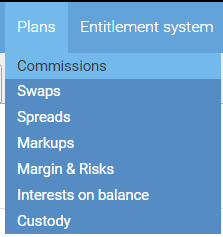
2. The following menu will appear:
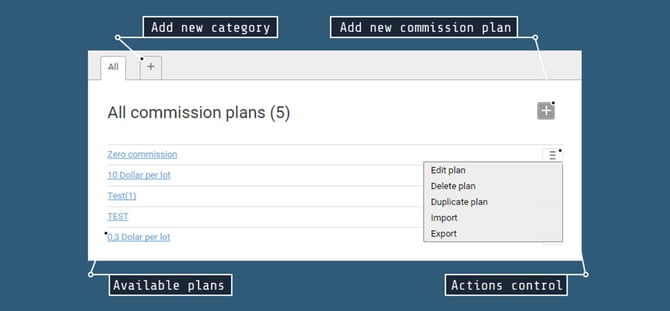
The following actions are available for commission plans:
- Add – To add a commission plan, click the + button.
- Edit – To edit a commission plan, click its name or the corresponding option in the context menu.
- Duplicate – This option opens a new commission plan form pre-filled with data from a selected commission plan.
- Delete – Removes a commission plan.
3. Click on the + button.
4. After creating a new Commission plan, select its Name. It is also possible to write any description for a plan.
5. Select "Save & Close".
6. In order to edit your new commission plan, select it from the list of available commission plans.
7. A pop-up menu will appear. Select "Per-instrument settings".
8. Select the Instrument group you want to change commissions for, e.g. Forex Pro Cross.
9. In the "Constant value" box, input the desired commission.
10. When you are done adjusting commissions, click "Save & Close".
11. After creating, the corresponding Commission plan will be available for selection in the User/User group -> Trading - > Plans -> Commission plan section.